-
... ges.githubusercontent.com/481589/216767388-d94cdd88-dc8f-4f95-9d87-1275583fb73b.jpg" alt="CuePlayer" width="130px" height="38px" align="right"></a> A tool for composing and performing real-time and mixed electronic works using the SuperColl ...
-
... INVERSION SHADER EXAMPLE ( a = SCImage .new( Document .current.dir +/+ "vduck2.jpg" ); // get the image k = SCImageKernel .new; k.shader_( " vec4 invertPixel(vec4 pix) { return vec4(1.0 - pix.r, 1.0 - pix.g, 1.0 - pix.b, pix.a); } kernel v ...
-
... VERSION SHADER EXAMPLE ( a = SCImage.new(SCDoc.helpSourceDir +/+ "images/vduck2.jpg"); // get the image k = SCImageKernel.new; k.shader_(" vec4 invertPixel(vec4 pix) { return vec4(1.0 - pix.r, 1.0 - pix.g, 1.0 - pix.b, pix.a); } kernel vec4 ...
-
... ara ver una demostración: [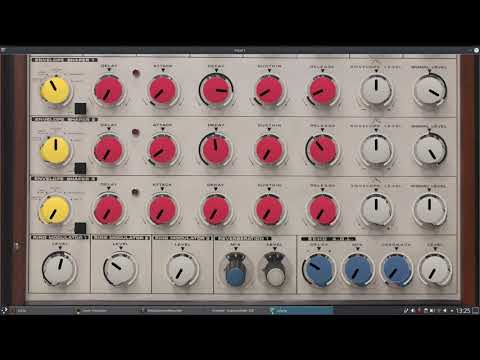](https://www.youtube.com/watch?v=EBUEooWrfBE) ## Sobre el Quark Este repositorio contiene un Quark de SuperCollider, consistente en un emulador del sinteti ...
-
... siting .sourceIn ; resources = Dictionary [ 'bg' -> Image ( "resources/gradient.jpg" ), 'icon' -> Image ( "resources/Swamp.png" ), 'recButton' -> [ Image ( "resources/TrBtn_record_off.tiff" ), Image ( "resources/TrBtn_record_off_p.tiff" ), ...
-
... ges.githubusercontent.com/481589/216767388-d94cdd88-dc8f-4f95-9d87-1275583fb73b.jpg" alt="CuePlayer" width="130px" height="38px" align="right"></a> A style agnostic framework for creative coding using the SuperCollider audio programming lan ...
-
... follow instructions from the score: https://pbs.twimg.com/media/DeD9P3aVQAMSIF2.jpg:large ( s.waitForBoot({ SynthDef(\voice, { | freq=440, time=5, pan=0.0 gate=0, atk=1, rls=5, sus=0.7, detune=0, width=0.5, amp=0.0, amptime ...
-
... : SCView SCMovieView can play movies such as .mov and mpg, and image files like jpg, png, tiff and others. See also: SCImage Creation / Class Methods *new (parent, bounds) parent - The parent view. bounds - An instance of Rect , or a Point ...
-
... h = "/tmp", <>fullpath; var fileType = "pdf"; // options: png, gif, tiff, jpeg, jpg, pdf, mov var <>frames = 30, <>fps = 30; var <>mode = "RGB"; var <>pythonString = false; var <>displayLatency = 1; // min. elapsed time (in secs.) between r ...
-
... 0.25 ), \v )]] ); ) ( r = Image.open ( "/Library/Desktop Pictures/Ripples Blue.jpg" ); t = SmoothButton (w, 80 @ 20 ).states_( [[ "image" , Color .black, r ]] ); ) SmoothButton has some extra features for graphic finetuning: radius the rad ...