-
... eated file:\n\t" ++ newName).postln; ^newName }; } convertImage { |newFormat = "jpg", newName = \auto| var path, result; path = this.standardizePath; case { [\auto, \self].includes( newName ) } { newName = path.removeExtension ++ "." ++ new ...
-
... g .sourceIn\ ;\ \ resources = Dictionary [\ 'bg' -> Image ( "resources/gradient.jpg" ), \ 'icon' -> Image ( "resources/Swamp.png" ), \ 'recButton' -> [ \ Image ( "resources/TrBtn_record_off.tiff" ), \ Image ( "resources/TrBtn_record_off_p.t ...
-
... ejing setup: unixCmd( "open" + Document .current.path.dirname.quote +/+ "impact.jpg" );
-
... is a synth. Programs look like this: --ab[(ab)(ab)(ab)]c  Semantics: - For live coding it follows a *dual language approach*: You can rewrite both the steno program and its sclang interpretation at runtime. So the ...
-
... ges.githubusercontent.com/481589/216767388-d94cdd88-dc8f-4f95-9d87-1275583fb73b.jpg" alt="CuePlayer" width="130px" height="38px" align="right"></a> A tool for composing and performing real-time and mixed electronic works using the SuperColl ...
-
... ara ver una demostración: [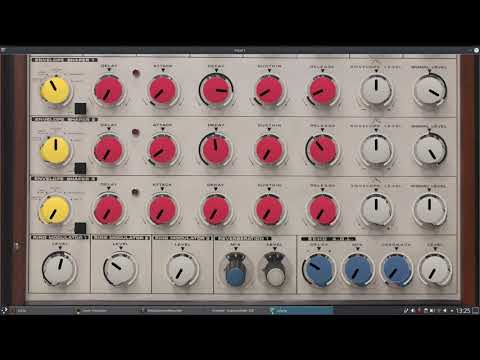](https://www.youtube.com/watch?v=EBUEooWrfBE) ## Sobre el Quark Este repositorio contiene un Quark de SuperCollider, consistente en un emulador del sinteti ...
-
... siting .sourceIn ; resources = Dictionary [ 'bg' -> Image ( "resources/gradient.jpg" ), 'icon' -> Image ( "resources/Swamp.png" ), 'recButton' -> [ Image ( "resources/TrBtn_record_off.tiff" ), Image ( "resources/TrBtn_record_off_p.tiff" ), ...
-
... ges.githubusercontent.com/481589/216767388-d94cdd88-dc8f-4f95-9d87-1275583fb73b.jpg" alt="CuePlayer" width="130px" height="38px" align="right"></a> A style agnostic framework for creative coding using the SuperCollider audio programming lan ...
-
... h = "/tmp", <>fullpath; var fileType = "pdf"; // options: png, gif, tiff, jpeg, jpg, pdf, mov var <>frames = 30, <>fps = 30; var <>mode = "RGB"; var <>pythonString = false; var <>displayLatency = 1; // min. elapsed time (in secs.) between r ...
-
... 0.25 ), \v )]] ); ) ( r = Image.open ( "/Library/Desktop Pictures/Ripples Blue.jpg" ); t = SmoothButton (w, 80 @ 20 ).states_( [[ "image" , Color .black, r ]] ); ) SmoothButton has some extra features for graphic finetuning: radius the rad ...